
How to use Fansbuy & the Fansbuy Spreadsheet
Two short walkthroughs: how to shop the spreadsheet, and how to buy through the Fansbuy agent — from your first link to your parcel landing at home.
Two loops: find a product on the Fansbuy Spreadsheet, then buy it through the Fansbuy agent — paste the link, pay, let Fansbuy QC and store it, then consolidate and ship.
- Part 1: search the spreadsheet, open a find and copy its link
- Part 2: paste that link into Fansbuy, choose your variant and pay
- Fansbuy inspects with free QC photos and holds items up to 90 days
- Combine several orders into one parcel, then pick a shipping line
Part 1 — How to use the Fansbuy Spreadsheet
Search what you want
Open the Fansbuy Spreadsheet on w2cspreadsheet.com and search by brand, item or keyword — or browse a category.
Pick the product
Browse the results with real photos, prices and reviews, and open the listing you want to buy.
Choose your agent
On the product page, pick the shopping agent you want to order through — such as Fansbuy — from the available options.
Click buy
Place the order and your chosen agent purchases it, inspects it, stores it and ships it to your door.
Part 2 — How to buy through Fansbuy

Find your item
Start with a link or a keyword — Fansbuy reads both.
- Paste a product link from Taobao, 1688 or Weidian (or a link shared by a promoter) into the search bar and hit Search.
- Or type a product name and pick from the recommended Taobao, Tmall and 1688 results.
- Buying a lot? Add everything to the cart first, then pay once.
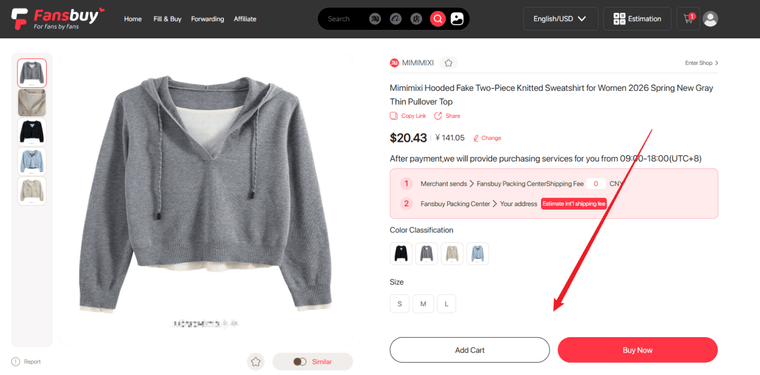
Submit the purchase request
Choose your variant and send the order to Fansbuy.
- Select colour, size and quantity, then "Add to Cart" or "Buy Now".
- Prefer to skip the search? Use Fill & Buy to enter the order details yourself and add to cart directly.
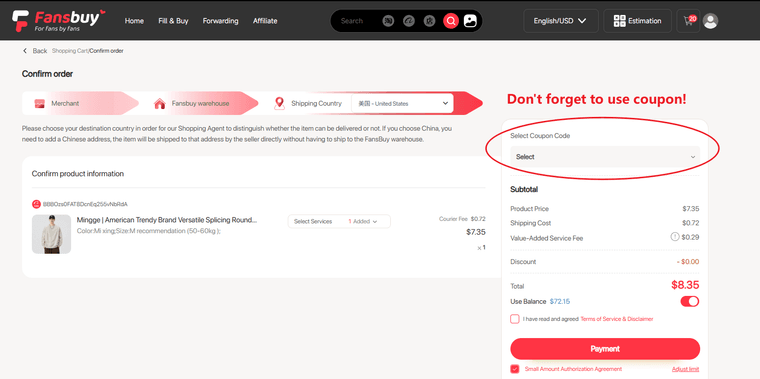
Confirm the order & pay
Pay the product price plus China-domestic shipping.
- Pick a payment method and destination country, add any value-added services, then pay.
- Multiple currencies and payment methods are accepted, with real-time exchange rates.
- A standard service fee applies — no hidden charges. You can also pay from your account balance.
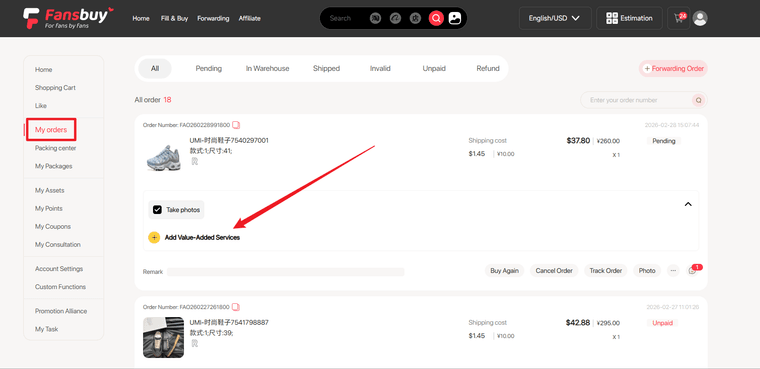
Fansbuy buys it for you
Sit back while Fansbuy places the order with the seller.
- Track progress from "My Orders". Need extras later? Add value-added services there too.
- Special requests can be sent to Fansbuy customer service at any point.
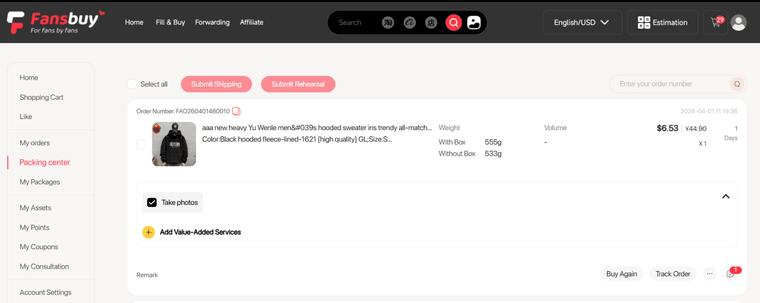
Inspection & free storage
Every parcel is received, weighed, photographed and stored.
- On arrival your items get a receipt inspection, professional weighing and photos before storage.
- Everything shows up in "Personal Centre → Packing Centre"; you are notified of any issues.
- Enjoy up to 90 days of free storage — combine more items to save on the international leg.
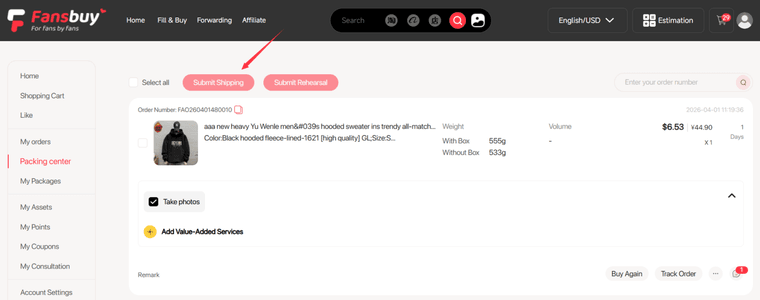
Submit a parcel & pay shipping
Consolidate, choose a line and pay the shipping deposit.
- In the Packing Centre, select items, click "Submit Shipping", enter the recipient address and pick a line.
- Optional Rehearsal Packing records exact weight & size for a precise quote.
- Fansbuy estimates the weight first; any overpayment is refunded to your balance automatically.
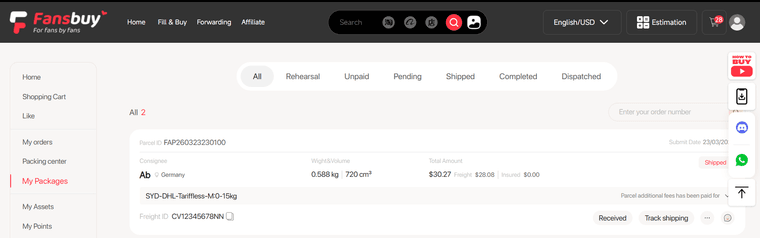
Receive your haul
Your order ships worldwide and lands at your door.
- Confirm receipt once it arrives. Damaged in transit? After-sales and insurance have you covered.
- Leave QC feedback and you are ready to start the next haul.
That's the whole loop
Discover on the spreadsheet, buy through the agent, consolidate and ship. Stuck on a detail? The Help Center has the specifics.